Saturday, February 17, 2018

ជា​ធម្មតា នៅ​ពេល​ដែល Touchpad កុំព្យូទ័រ​គាំង អ្នក​​​ប្រើ​ធម្មតា​ៗ​អាច​មិន​ហ៊ាន​ទៅ​ឆ្កឹះឆ្កៀល​រុក​រក​នោះ​ទេ ខ្លាច​ច្រឡំ​ចុច​ប៉ះ​អ្វី​ទៅ​បណ្ដាល​ឲ្យ​ខូច​លើស​ដើម។ យ៉ាង​ណា​មិញ Sabay ធានា​ថា បន្ទាប់​ពី​អនុវត្ត​តាម​វិធី​នេះ អ្នក​ប្រាកដ​ជា​អាច​យក​ទៅ​ដោះ​ស្រាយ​ដោយ​ខ្លួន​ឯង​បាន។

Thursday, February 8, 2018

Page Level Metrics

Engagement: A Like, Comment, Share or click received on a post from your Page.
People Engaged: The unique number of people who Like, Comment, Share or click on posts from your Page.
Engagement Rate: The percentage of people who engaged with your Page (liked, commented, shared or clicked on posts from your Page) after seeing activity about your Page.
Engagement Rate (%) = People Engaged/People Reached
Page Consumption: An interaction received on activity from your Page. Page Consumption includes Link Clicks, Photo Views, Video Plays, and Other Clicks.
Negative Feedback: An undesired action performed on your Facebook page, including the below.
·         Hide Post: When a user hides a post by your Page from their News Feed
·         Hide All Posts: When a user hides all posts by your Page from their News Feed
·         Unlike Page: When a user unlikes your Page
·         Report Spam: When a user reports a post from your Page to Facebook as spam
People Reached: The number of unique people who saw activity about your Facebook Page. Reach can be broken down into:
·         Organic Reach: The number of people who saw activity related to your Page directly from your Page
·         Paid Reach: The number of people who saw activity related to your Page  via a paid Facebook ad
·         Viral Reach: The number of people who saw activity related to your Page via a story published by a friend. For instance, if someone Likes, Comments, or Shares a post by your page, their friends might see that a story about your page virally.
Impressions: The total number of times activity related to your page was seen by people on Facebook. Impressions can be broken down into:
·         Organic Impressions: The number of times people saw activity related to your Page directly from your Page
·         Paid Impressions: The number of times people saw activity related to your Page via a paid Facebook ad.
·         Viral Impressions: The number of times people saw activity related to your page via a story published by a friend. For instance, if someone Likes, Comments, or Shares something on your page, their friends might see a story about your page virally.


Post Level Metrics


Post Type: A Facebook post could be a Photo, Video, Status, or a Link.
Media Mix: The number of times each media type (photo, video) was used in Posts.
Promoted Post: A Facebook Post that has received paid distribution across Facebook in the form of a Facebook ad.
Post Impressions: The total number of times your post was seen by people on Facebook. Post Impressions can be broken down into:
·         Organic Impressions: The number of times people saw your Post directly from your Page.
·         Paid Impressions: The number of times people saw your Post via a paid Facebook ad.
·         Viral Impressions: The number of times people saw your Post via a story published by a friend. For instance, if someone likes, comments or shares your Post, their friends might see a story about your Post virally.
Post Reach: The number of unique people who saw your Facebook Post. Post Reach can be broken down into:
·         Organic Reach: The number of people who saw your Post directly from your Page.
·         Paid Reach: The number of people who saw your Post via a paid Facebook ad.
·         Viral Reach: The number of people who saw your Post via a story published by a friend. For instance, if someone likes, comments or shares your Post, their friends might see a story about your Post virally.
% Fans Reached by Post: The percentage of your Page’s fans who saw your Post.
% Fans Reached (%) = Post Reach/Page Fans
Post Engagement: The number of unique people who engaged with your Post (liked, commented, shared or clicked on the Post).
Stories Created on Page: The total number of likes, comments and shares received on your Post.
Post Virality: The number of stories created from your Post as a percentage of the total number of times your Post was seen by people on Facebook.
Post Virality (%) = Stories Created on Post/Post Impressions
Post Engagement Rate: The percentage of people who engaged with your Post (liked, commented, shared or clicked on the Post) after seeing the Post on Facebook.
Post Engagement Rate (%) = Post Engagement Engagement/Post Reach
Post Negative Feedback: An undesired action performed on your Post.
·         Hide Post: When a user hides your Post from their News Feed
·         Hide All Posts When a user hides all Posts by your Page from their News Feed
·         Unlike Page: When a user unlikes your Page
·         Report Spam: When a user Reports your Post to Facebook as Spam
Post Engagement Score: A customized score for your Post, based on custom weighted engagement parameters defined by you. W, X, Y and Z are custom weighted parameters defined by a Crowdbabble user.
Post Engagement Score = (W * Likes) + (X * Comments) + (Y * Shares) + (Z * Clicks)
Fan Posts: A Post publicly published to the Wall of your Facebook Page by a Facebook user.
Post Consumption: An interaction with a Post by a Facebook user. Possible interactions include:
·         Link Clicks
·         Photo Views
·         Video Plays
·         Other Clicks


Fans


Page Likes (Fans): People who Like your Facebook Page.
Page Like Growth: The change in Page Likes over a given time period.
Like Sources: The different referral URLs or sites from which people can Like your Page.
Demographics: Age and gender, country, city, and language of Facebook users.
·     Fan Demographics: Demographics of the people who have Liked your Page.
·     People Reached Demographics: Demographics of the people who have seen content from your Facebook Page.
·     People Engaged Demographics. Demographics of the people who have engaged with content (liked, commented, or shared) on your Facebook Page, whether or not they are fans.


Customer Service


Response Time: The length of time it took for the Page to respond to a Fan Post.
Response Rate: The percentage of Fan Posts that the Page has responded to with a Comment.
Acknowledgement Rate: The percentage of Fan Posts that the page has either responded to with a Comment and/or a Like.
Response Time By Hour: The length of time it took for the Page to respond to Fan Posts, by hour of day.
Response Time by Day: The length of time it took for the Page to respond to Fan Posts, by day of week.


 ពុធ, 5 កក្កដា 2017 11:45
  •  ចំនួនមតិ 0
ចន្លោះមិនឃើញ
​ដូច​ដែល​ប្រិយមិត្ត​ដឹង​ហើយ​ថា​នៅ​ភព​ផែនដី​ ​គឺ​មាន​តែ​ព្រះចន្ទ​តែ​មួយ​ប៉ុណ្ណោះ​ ​ប៉ុន្តែ​សម្រាប់​ភព​ដទៃ​ផ្សេង​ទៀត​ខ្លះ​មាន​ច្រើន​ ​ហើយ​ភព​ខ្លះ​គ្មាន​តែ​ម្ដង។
  • ភព​ពុធ​ ​(Mercury)​ ​និង​ភព​សុក្រ​ ​(Venus)
ភព​ទាំង​ពីរ​នេះ​គ្មាន​ព្រះចន្ទ​នៅ​ក្បែរ​នោះ​ទេ។ ចំពោះ​ភព​ពុធ​ ​ដោយសារ​វា​ស្ថិតនៅ​ក្បែរ​ព្រះអាទិត្យ​ ​ដូច្នេះ​វា​មិន​អាច​មាន​ព្រះចន្ទ​នោះ​ទេ​ ​ហើយ​វត្ថុ​នានា​ដែល​ហោះ​ចូល​គន្លង​របស់​ភព​នេះ​ ​នឹង​ត្រូវ​ទាញ​ចូល​ព្រះអាទិត្យ​ទាំង​អស់។ ដោយ​ឡែក​ ​សម្រាប់​ភព​សុក្រ​ ​គឺ​មិន​ទាន់​មាន​ការ​បក​ស្រាយ​ណា​ពី​អ្នក​វិទ្យាសាស្ត្រ​នោះ​ទេ​ ​ព្រោះ​ស្ថិត​ក្នុង​ដំណាក់កាល​ស្រាវជ្រាវ។
  • ភព​អង្គារ​ ​(Mars)
ភព​អង្គារ​ ​មាន​ព្រះចន្ទ​ដល់​ទៅ​ពីរ​ ​ហើយ​មាន​ឈ្មោះ​ថា​ ​Phobos​ ​និង​ ​Deimos។
  • ភព​ព្រហស្បតិ៍​ ​(Jupiter)
ភព​ព្រហស្បតិ៍​ ​គឺ​ជា​ភព​ធំ​ជាងគេ​ ​ហើយ​វា​មាន​ព្រះចន្ទ​ដល់​ទៅ​ ​៥៣។ ព្រះចន្ទ​ភព​នេះ​ដែល​គេ​ស្គាល់​ច្រើន​រួមមាន​ ​lo, Europa និង​ ​Callisto។ មិន​ត្រឹម​តែ​ខ្លួន​ធំ​ជាង​ភព​នានា​ ​ភព​ព្រហស្បតិ៍​ក៏​មាន​ព្រះចន្ទ​ធំ​ជាង​គេ​ក្នុង​ប្រព័ន្ធ​ព្រះអាទិត្យ​ឈ្មោះ​ ​Ganymede​ ​ផង​ដែរ។
  • ភព​ ​Saturn
ភព​ ​Saturn​ ​ក៏​មាន​ព្រះចន្ទ​ ​៥៣​ ​ដូច​ភព​ព្រហស្បតិ៍​ដែរ​ ​ហើយ​ព្រះចន្ទ​ធំៗ​របស់​ភព​នេះ​មាន​ឈ្មោះ​ដូច​ជា​ ​Mimas, Titan, Enceladus​ ​និង​ ​Tethys។
  • ភព​ ​Uranus
ភព​ ​Uranus​ ​មាន​ព្រះចន្ទ​ចំនួន​ ​២៧​ ​ហើយ​មួយ​ចំនួន​នៃ​ព្រះចន្ទ​ទាំង​នោះ​កកើត​ចេញ​ពី​ទឹកកក។
  • ភព​ណិបទូន​ ​(Neptune)
ភព​ណិបទូន​ ​(Neptune)​ ​មាន​ព្រះចន្ទ​ចំនួន​ ​១៣​ ​ហើយ​ក្នុង​ចំណោម​ព្រះចន្ទ​ទាំង​នោះ​ ​មាន​មួយ​ឈ្មោះ​ ​Triton​ ​ដែល​មាន​ទំហំ​ធំ​ដូច​នឹង​ភព​ ​Pluto។
  • ​ព្រះ​ចន្ទ​ផ្សេង​ទៀត
បច្ចុប្បន្ន​មាន​ព្រះ​ចន្ទ​ ​២៤​ ​ទៀត​ដែល​គេ​មិន​ទាន់​រាប់​បញ្ចូល​ព្រោះ​កំពុង​សិក្សា​ស្រាវជ្រាវ​ ​ដោយ​ ​១៤​ ​ជា​របស់​ភព​ព្រហស្បតិ៍​ ​៩​ ​ជា​របស់​ភព​ ​Saturn​ ​និង​ ​១​ ​ជា​របស់​ភព​ណិបទូន​ ​ហើយ​ប្រសិន​លទ្ធផល​ទាំង​នោះ​សម្រេច​ ​ភព​ព្រហស្បតិ៍​នឹង​មាន​ព្រះ​ចន្ទ​ឡើង​ដល់​ ​៦៧​ ​៕
សុក្រ, 5 ឧសភា 2017 16:16
  •  ចំនួនមតិ 6
ចន្លោះមិនឃើញ
Hard disk ប្រភេទ SSD និង HDD មាន​តម្លៃ​ខុស​គ្នា​ឆ្ងាយ​។ នៅ​ពេល​ទិញ​កុំព្យូទ័រ​គេ​ចង់​បាន Hard disk​ ដែល​មាន​គុណ​ភាព​ខ្ពស់​ប្រភេទ SSD។ ធ្វើ​យ៉ាង​ណា​ទើប​ដឹង​ថា​កុំព្យូទ័រ​មួយ​ប្រើ Hard disk ប្រភេទ​អ្វី​? ដូច្នេះ​កុំ​ឲ្យ​ចេះ​តែ​លឺ​គេ​ថា​យើង​គួរ​តែ​ដឹង​ពី​របៀប​ឆែក​មើល​ដោយ​ខ្លួន​ឯង។
ខាង​ក្រោម​នេះ​ជា​របៀប​ឆែក​ (​ចាប់​ពី Windows 8 ឡើង)
  • ចុច ​Mouse ខាង​ស្ដាំ​លើ​​ Partition  ណា​មួយ​ដែល​អ្នក​ចង់​ឆែក (ឧ: Local Disk (C:))
  • បន្ទាប់​មក​ចុច​លើ Properties
  • បន្ត​ចុច​លើ​របារ Tools អ្នក​នឹង​ឃើញ​ពាក្យ​ថា​ Optimize
  • ចុច​លើ Optimize
  • រង់ចាំ​បន្តិច​អ្នក​នឹង​ឃើញ​ផ្ទាំង​មួយ​លោត​ឡើង
  • ចំណាំ៖
  • Solid state drive បញ្ជាក់​ថា​ Hard disk នេះ​ជា​ប្រភេទ SSD
  • Hard disk drive បញ្ជាក់​ថា​ Hard disk នេះ​ជា​ប្រភេទ HDD

អត្ថបទ៖ ពិចិត្រ

ពុធ, 31 មករា 2018 09:50
  •  ចំនួនមតិ 0
ចន្លោះមិនឃើញ
បញ្ហា​លើ Touchpad គាំង​មិន​ដំណើរការ​អាច​មាន​ភាគច្រើន​លើ Laptop ចាស់ៗ ​តែ​ក៏​មាន​មួយ​ចំនួន​លើ Laptop ថ្មីៗ​ដែរ ដោយសារកត្តាមួយចំនួនអាចជា Software និង Hardware. ដូច្នេះទោះ​អ្នក​មាន​បញ្ហា​នេះ ឬ​គ្មាន អ្នក​គួរ​ដឹង​ពី​ដំណោះស្រាយ​ទាំងនេះ​បាន​។

ប្រព័ន្ធ​ប្រតិបត្តិការ​មិន​ដំណើរការ​

អ្នក​គួរ​ត្រួតពិនិត្យ​ប្រព័ន្ធ​ប្រតិបត្តិការ​ក្រែង​ល គាំង ព្រោះ​កាល​ណា​គាំង​ការ​បញ្ជា​ផ្សេងៗ​នឹង​មិន​ដំណើរការ​រួម​ទាំង Touchpad ផង​ដែរ​។ 
អ្នក​អាច​សាក​ចុច​លើ​ប៊ូតុង Num Lock ឬ Scroll Lock  លើ Keyboard ដើម្បី​ពិនិត្យ​មើល​ពន្លឺ​។ បើ​អាច​បើក​បិទ​ពន្លឺ​បាន​ធម្មតា​លើ​ប៊ូតុង​នោះ កុំព្យូទ័រ​មិន​គាំង​ទេ​។ អ្នក​អាច​សាកល្បង​បិទ​បើក​កុំព្យូទ័រ ក្នុង​ការ​សម្រួល​ប្រព័ន្ធ​។ 

ប៊ូតុង​លើ Touchpad

Laptop មួយ​ចំនួន​មាន​ប៊ូតុង​នៅ​ពី​លើ ឬ​នៅ​កៀន ឬ​មាន Fn Key ដើម្បី​បិទ​បើក​ដំណើរការ Touchpad។ អ្នក​គួរ​សាកល្បង​បិទ​បើក​សាកមើល​។ 

External device

Device ភ្ជាប់​តាម USB មួយ​ចំនួន​អាច​បិទ Touchpad ដោយស្វ័យប្រវត្តិ ពេល​ភ្ជាប់​ទៅ​នឹង​ Laptop។ អ្នក​អាច​សាកល្បង​ដក​ចេញ​សិន ហើយ​បិទ​បើក​កុំព្យូទ័រ និង​ដោត​ភ្ជាប់​ម្តង​ទៀត​។ 

អ្នក​អាច​ពិនិត្យ​មើល Setting មួយ​ចំនួន​

Mouse settings

អ្នក​គួរ​ចូល​ទៅ​មើល Mouse ឬ Touchpad settings ដើម្បី​ប្រាកដ​ថា​គ្រប់យ៉ាង​ដំណើរការ​ធម្មតា​ ។
សម្រាប់​អ្នក​ប្រើប្រាស់ Windows
  • ចុច​លើ Start Menu ហើយ​វាយ​បញ្ចូល Change mouse settings រួច​ចុច Enter
  • នៅ​លើ​ផ្ទាំង Mouse Properties អ្នក​ចូល​ទៅ​កាន់ Touchpad settings ធម្មតា​ស្ថិត​នៅ​ក្បែរ​នឹង Tabs ឈ្មោះ Hardware
  • អ្នក​គួរ​ប្រាកដ​ថា​ប្រអប់​ក្បែរ Enable touchpad បាន Check (ចុច​បើក​ដំណើរការ​)
  • កែប្រែ Settings ណា​មួយ​អ្នក​ចង់​បាន ហើយ​ចុច​លើ​ Apply > OK
សម្រាប់​អ្នក​ប្រើប្រាស់ macOS
  • អ្នក​អាច​ចូល​ទៅ​កាន់ System Preferences ក្នុង Apple menu នៅ​លើ​អេក្រង់​ខាងលើ​ ឬ ចុច icon System Preferences នៅ​ផ្នែក​ខាងក្រោម​អេក្រង់​បាន​។ 
  • នៅ​លើ​ផ្ទាំង System Preferences ចុច​លើ icon Trackpad ដើម្បី​បើក Trackpad settings។
  • កែប្រែ Trackpad settings ណា​មួយ​អ្នក​ចង់​បាន​

ត្រួតពិនិត្យ​មើល Device Manager និង​ធ្វើ​កំណែទម្រង់ Driver

បើ Touchpad នៅ​តែ​មិន​ដំណើរការ អ្នក​អាច​ពិនិត្យ​លើ Device Manager ដើម្បី​ឃើញ​ពី​បញ្ហា​។
  • ចុច​លើ Start menu រួច​វាយ​បញ្ចូល Device manager បន្ទាប់​មក Enter
  • នៅ​ក្រោម PC អ្នក ចុច​ពីរ​ដង Mice and other pointing devices
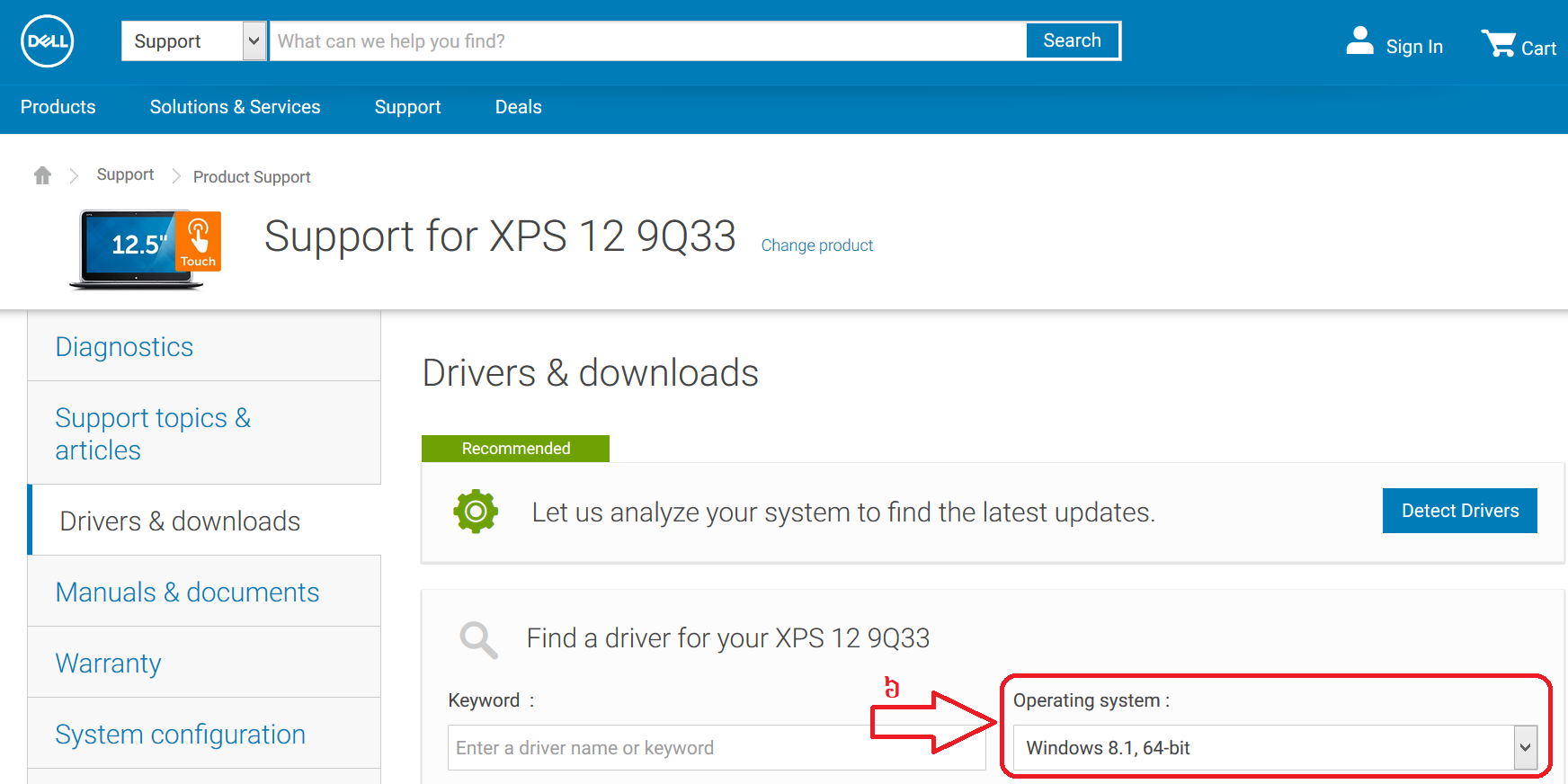
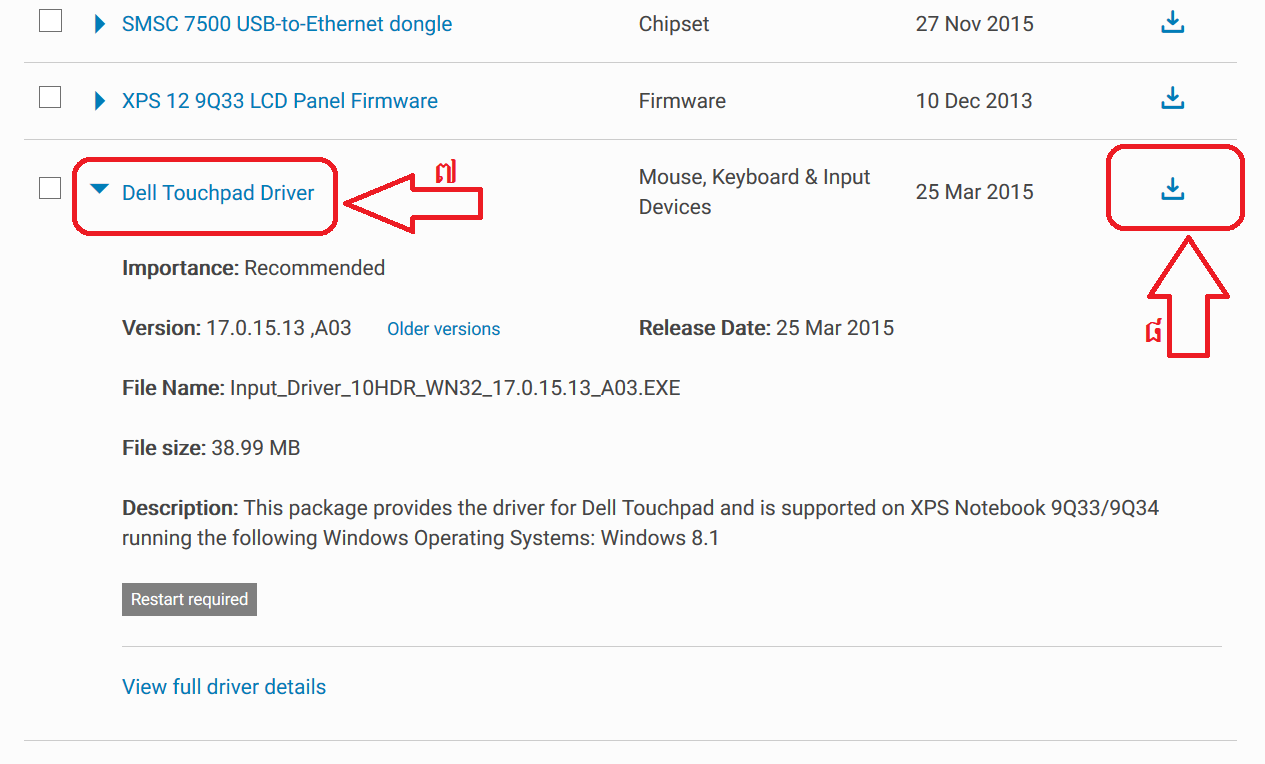
  • ចូល​ដល់ Touchpad អ្នកប្រើ ហើយ​ចុច Mouse ស្តាំ​លើ icon នោះ​ជ្រើសរើស Update Driver Software... - ចុច​លើ Search automatically for updated driver software ក្នុងករណី Driver អ្នក​ហួសសម័យ (Out of date)
អ្នក​អាច​បិទ​បើក​កុំព្យូទ័រ ក្រោយ​ធ្វើ​កំណែទម្រង់​រួច​។

ត្រួត​ពិនិត្យ​លើ CMOS (BIOS) setup

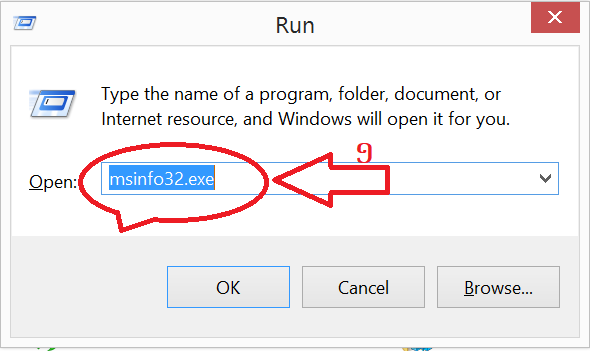
អ្នក​គួរ​ប្រាកដ​ថា Touchpad មិន​បាន​បិទ​ក្នុង CMOS (BIOS) setup ។  CMOS (BIOS) setup ជា​កម្មវិធី​មាន​ផ្ទាំង​ខៀវ​អ្នក​បាន​ឃើញ​ពេល​ចុច Key ណាមួយ មុន​ពេល​ប្រព័ន្ធ​ដំណើរការ​ពេញលេញ​។ អ្នក​ប្រហែល​ជា​ឃើញ​ច្រើន ពេល​អ្នក​ចង់​ដំឡើង Window ថ្មី​។
នៅ​ផ្ទាំង​ខៀវ​នោះ អ្នក​អាច​ពិនិត្យ​លើ Hardware device settingsឬ ក្នុង Advanced > Internal Pointing Device ក្រែង Touchpad បាន​បិទ​។ បើ​វា​បិទ​នៅ​ទីនោះ អ្នក​អាច​បើក​វិញ ហើយ​បិទ​បើក​កុំព្យូទ័រ​។
កត្តា​មួយ​ទៀត គឺ File ក្នុង​ប្រព័ន្ធ​ប្រតិបត្តិការ​ខូច​ច្រើន ដែល​ខ្លះ​អាច​ប៉ះពាល់​ដំណើរការ Touchpad។ អ្នក​អាច​សាក Repair ប្រព័ន្ធ​ប្រតិបត្តិការ មិនមែន​ដំឡើង​ថ្មី​ទេ គ្រាន់​តែ​ជួសជុល File ខូច​ទាំងនោះ​។ ករណី អនុវត្ត​តាម​វិធី​នេះ​នៅ​តែ​មិន​ដំណើរការ អ្នក​គួរ​យក​ទៅ​ហាង​កុំព្យូទ័រ​ពិនិត្យ​មើល​៕

Unordered List

Sample Text

Pages

Powered by Blogger.

As a biginner of technology i m really want to know about the develope the technology in cambodia

Blogger news

Blogger templates

Popular Posts

Recent Posts

Text Widget